problem statement
at any given time, your browser does several things in parallel, typically
monitor and reacts to user inputs (mouse & keyboard)
network activity (during page loading, but also when issuing API calls,...)
and so there is a crucial need for supporting parallelism
and ideally in a way that makes code better (as in more legible)
(remember the best measurement of code quality is expressed in wtf/mn ;)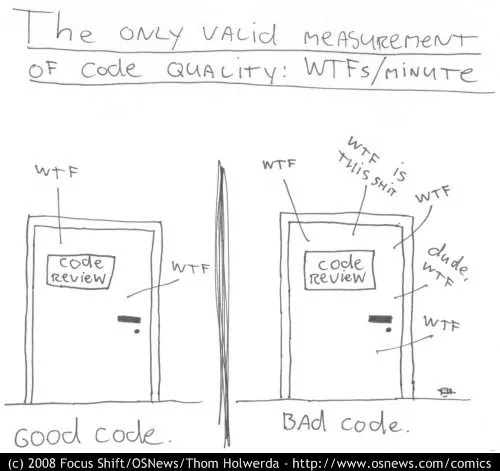
but seriously though, let us consider some typical situations where concurrency is key
ex1: page loading issue
the browser starts displaying the page long before it is all loaded
plus, in most cases, code order matters:
for instance your code cannot spot an element in the DOM if it was not yet created
you cannot use a given JavaScript library if its code has not finished loading
ex2: networking from JS
the naive paradigm is: users types in a URL (or clicks a link), the browser sends a request to the server, and displays the (HTML) result
this is not good enough ! - consider the case of pagination in an e-commerce website
if we had only that approach, would bring to permanent page changes (harsh pagination)
so instead, the client (JS side) needs to be able to sends its own http requests [1]
and to receive results not as HTML, but as pure data - typically JSON
so it can change the page content without reloading an entire page (soft pagination)
same thing for example to get information about the basket
this is where the fetch() tool comes in
see also: the TP on xkcd and the TP on chatbot where we will practise this thoroughly
callbacks hell
so far we have seen one tool to deal with concurrency: callbacks
however the code can quickly become what is known as the callbacks hell
which does not scale very well, because an essentially sequential business ends up creating a deeply nested program structure
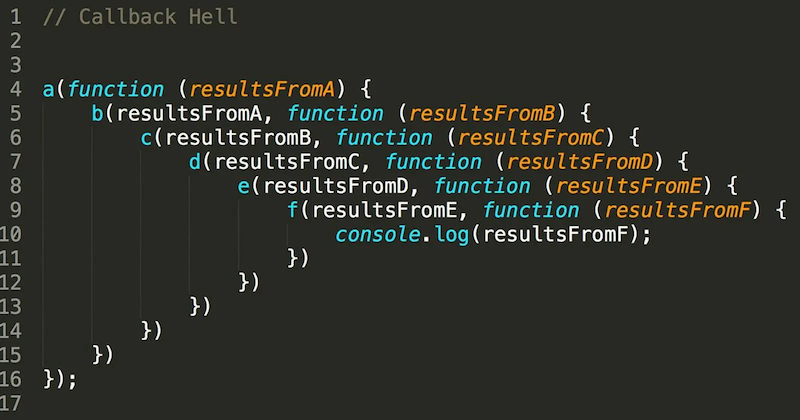
and it gets even worse if any kind of logic (if, while) is involved..
better tools: promises and async
to mitigate this issue, we have 2 additional tools
promises
async/await
digression: the REPL
before going further, it’s important to remember the logic of the REPL:
REPL = Read, Evaluate, Print, Loop
when you run a line of code, the REPL evaluates it, and prints the result
andwhen there are several expressions in the line, it evaluates them all
but it will print only the last result
// when this block is copied in the console, it will print .. 6
10 * 100
10 * 200
2*3
promise example with fetch()
to illustrate the notion of promises:
we see how the browser typically sends its own HTTP requests
our example is about fetching some DNA samples on www.ebi.ac.uk, but the content is not really important, it’s just an example..
and notably, the same technique can be used as-is to send API calls
to achieve this we have a builtin function called fetch(), that returns a promise object
1 2 3 4 5 6 7 8 9 10 11 12 13 14// let us start with defining a few URLs // NOTE that they do NOT return HTML, it's actually PLAIN TEXT // in some kind of bio-informatics standard... // to get a glimpse, point your navigator to the first one // a valid small DNA sample (60 kb) URL_small = 'https://www.ebi.ac.uk/ena/browser/api/embl/AE000789?download=true' // valid too, but larger (10 Mb) URL_large = 'https://www.ebi.ac.uk/ena/browser/api/embl/CP010053?download=true' // an invalid URL - used later for error management URL_broken = 'https://some-invalid/web/site'
fetching a small file
that done, we can fetch one URL (the small one for starters) with this code:
1 2 3fetch(URL_small) .then(response => response.text()) .then(text => console.log(`received ${text.length} characters`))
as you can see, this causes 2 things:
a
Promiseobject gets printeda little while later, we get a message with the size of the downloaded file
next, we’ll redo it with a larger file, that takes a longer time, to get a better understanding
again with a larger file
let’s kind of zoom in, and redo the same with a larger URL that will take more time
run the following code, and observe that:
the http request is sort of “running on its own”
during all the time it takes to fetch the data, we can still run code !
observe in particular how the last
console.log()runs immediately
and before the fetch is complete
1 2 3 4 5 6 7 8 9// again with a larger file // observe how the network activity happens "in the background" fetch(URL_large) .then(response => response.text()) .then(text => console.log(`received ${text.length} characters`)) // proceed to running these immediately console.log("I am still alive...", 10 * 2000)
promises
.then()
typically, you use a library function that returns a promise
like here: fetch() is such a function that returns a promise
creating a promise is like starting a separate task, it will be processed in parallel !
and you can use .then() to specify what should happen next
(i.e. when the promise is complete)
the gory details about .then()
here are more details on the expected arguments of .then()
promise.then(function_ok, function_ko)where
function_okis triggered if “all goes well”function_kois triggered otherwise - note that this second argument is optionalfunction_okis a function that consumes the output of the promise (once it is complete)
and produces (returns) the output of the.then()callso in other words, the
.then()expression also returns .. a promise whose result is the result offunction_ok
pending, fulfilled, or rejected
there is no need to bother about that in your code
since that is exactly what then() will manage for you
but well, if only for your curiosity:
upon creation the promise is set in state
pendingthe event loop will make it progress behind the scene, and it can
either end well, in which case its state becomes
fulfilledor it can fail, and its state becomes
rejected
.then().then()
all this allows for chaining, like we did when fetching the URLs above
specifically, in these examples above, what happens is
by sending a
fetch()we initiate an HTTP requestthe corresponding promise will be fulfilled as soon as the HTTP headers are received
the promise returned by
fetch()returns aResponseobject,
that in turn has a.text()method, that returns .. a promise, whose value is the full response body
why 2 phases ?
the reason for splitting the process in two is for more flexibility
this way we could inspect the HTTP headers without the need to wait for the whole response
promises created by program
here’s another illustration, this time with a promise created programatically
// another way to create a promise
// (it takes no time and always succeed)
Promise.resolve(5)
   .then(res => res * 2)
   .then(res => res * 2)
   .then(res => res * 2)
   .then(res => res * 2)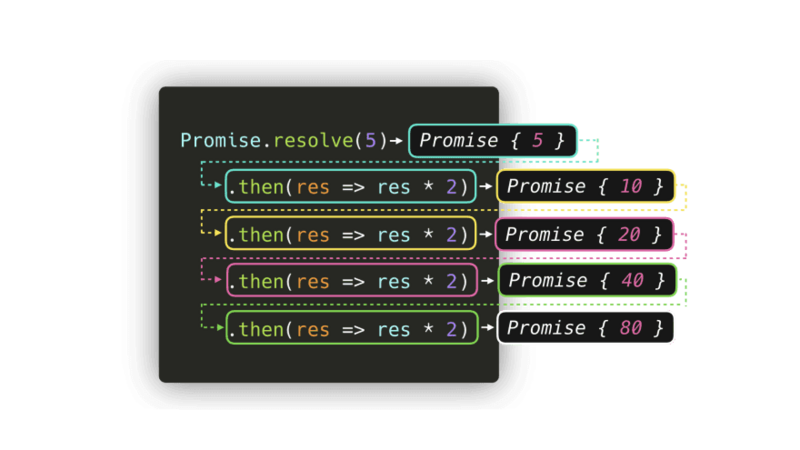
as a function
let us now rewrite our code into a proper function, so we can use it on any URL
// for convenience, just in case we need to copy that again

URL_small = 'https://www.ebi.ac.uk/ena/browser/api/embl/AE000789?download=true'
URL_large = 'https://www.ebi.ac.uk/ena/browser/api/embl/CP010053?download=true'
URL_broken = 'https://some-invalid/web/site'
without error management
in this first iteration, we do not handle errors
for the sake of simplicity, we just display:
the HTTP return code (digression: google for ‘http return codes’)
the size of the response payload
and we return the actual body
1 2 3 4 5 6 7 8 9 10 11 12 13 14 15 16 17const get_url1 = (url) => { // hope for the best (no error handling) let promise = fetch(url) .then(response => { // display http status from header // to illustrate that it is available early console.log(`${response.url} returned ${response.status}`) // actually get the contents // and pass it to next stage return response.text() }) .then(text => { console.log(`${url} page contains ${text.length} bytes`) return text }) return promise }
and here is how we could use it
since our function returns a promise, we use it with .then(), just like we did with fetch()
// let us display the first 20 characters in the file

get_url1(URL_small)
.then(text => console.log(`first 20 characters >${text.slice(0, 20)}<...`))but when called on a broken URL, this code raises an exception:
get_url1(URL_broken)so we need some tool to handle errors, and that’s the purpose of .catch()
.catch()
just like
.then(), thecatch()method applies on a promiseit allows to deal with errors
a common pattern is to apply it to the last
.then()in the chainthis way, any error occurring at any stage in the chain gets captured
if you’ve read the gory details above
this means that catch(failureCallback) is short for then(null, failureCallback)
with error management
so we can come up with a second iteration, where we take care of errors
to this end, we add a catch() at the end
1 2 3 4 5 6 7 8 9 10 11 12 13 14 15 16 17 18 19 20 21const get_url2 = (url) => { // let's get rid of the promise variable, not needed return fetch(url) .then(response => { console.log(`${response.url} returned ${response.status}`) return response.text() }) .then(text => { console.log(`actual page contains ${text.length} bytes`) return text }) // this catch will deal with any error in the upstream chain .catch(err => console.log(`OOPS with ${url}`, err)) // just to show that the exception was properly handled .then((text) => { console.log("the show must go on") return text }) }
.catch() recalls exception handling
let us run this code with an invalid URL
note that the error occurs in the
fetch()call itselfand not in any of the 2
.then()still, the error gets captured at the end of the chain
this recalls the way exceptions bubble up to find a
catchstatement
// and now, no exception occurs on an invalid URL
// we just receive a void result from get_url2 in that case

get_url2(URL_small)
    .then(text => {
        if (text)
            console.log(`first 20 characters >${text.slice(0, 20)}<...`)
    })
no more pyramid of doom
with this model, we can now avoid the pyramid of doom, using chaining
which means that this code (not runnable of course)
1 2 3 4 5 6 7 8 9// nested / pyramidal doSomething(function(result) { doSomethingElse(result, function(newResult) { doThirdThing(newResult, function(finalResult) { console.log(`final result ${finalResult}`) }, failureCallback) }, failureCallback) }, failureCallback)
becomes this linear form, that much better describes the logic
1 2 3 4 5 6 7 8 9 10 11doSomething() .then(function(result) { return doSomethingElse(result) }) .then(function(newResult) { return doThirdThing(newResult) }) .then(function(finalResult) { console.log(`final result ${finalResult}`) }) .catch(failureCallback)
async / await
hopefully you are now convinced that promises are cooler than callbacks - for this kind of processing at least
however the syntax is still a little awkward, and so in order to further improve readability, these 2 keywords have been introduced:
async functions
with async we can create a function that returns a Promise by default
moreover, all functions that return a Promise, including .fetch(),
are called asynchronous functions
the await keyword
the await keyword allows to wait for the result of a promise (as opposed to getting the promise itself !)
limitation on where await can be used
await can be usedin general, await can only be used inside an async function
for convenience though, it is more and more also supported at the interpreter
toplevel (right in the REPL)
async get_url()
let us see how we could take advantage of these new features to rewrite get_url()
1 2 3 4 5 6 7 8 9 10 11 12 13 14// ↓↓↓↓↓ const get_url = async (url) => { try { // ↓↓↓↓↓ response = await fetch(url) console.log(`status=${response.status}`) // ↓↓↓↓↓ let text = await response.text() console.log(`length=${text.length}`) return text } catch(err) { console.log(`OOPS with url=${url}`, err) } }
and here is how we would use this code
let text = await get_url(URL_small)
console.log(`first 20 characters >${text.slice(0, 20)}<...`)
see also
this is just an overview, refer to
also this article on MDN can come in handy about promises too
benefits of promises
promises run as coroutines
let us observe what happens if we create several promises at the same time
remember that promise creation returns immediately
(we’ve seen the REPL working right after we had created our promise earlier)for example here is how we could fetch these 3 URLs simultaneously
that’s the main point of promises
// let us fetch the 3 URLS **at the same time**

for (let url of [URL_broken, URL_small, URL_large])
get_url(url)Promise.all()
but now, when running several things in parallel like this, we may need to also retrieve their results
that is the point of
Promise.all()- and similar toolsthat creates a promise from a collection of promises
waits for some/all of them to complete
and exposes the results as an array
1 2 3 4 5 6 7 8 9// could also use .map(), but let's keep it simple promises = [ get_url(URL_broken), get_url(URL_small), get_url(URL_large) ] contents = await Promise.all(promises) // then, once all fetches have completed, // you find in contents[0] .. contents[2] the 3 texts returned // e.g. first one being undefined because the url is broken
typically, API calls are also sent over HTTPS, but anyway