events
due to the specificity of the browser and the network, JavaScript within the browser is not driven like other languages
there is no
main()function that runs foreverit is not either driven like a video game, i.e. by an infinite loop that eats all the CPU
instead JavaScript is driven by events, which can be of different kinds:
can come from the user activity such as mouse click
can be time-bound
can be linked to network activity
callbacks
events are handled using callbacks
callbacks are functions that are triggered when an event occur
to get a function to be called on a given event, you have to use
addEventListener()the callback function typically receives an event object as a parameter
addEventListener()
a fundamental tool to register a callback with an event
available on most objects (not only
document, often used on a DOM element)again, observe on the example below, how the callback receives the event in parameter
example: load, click and `keydown
in this first version we are going to use globally defined functions
timeline
here’s a timeline of what is going on
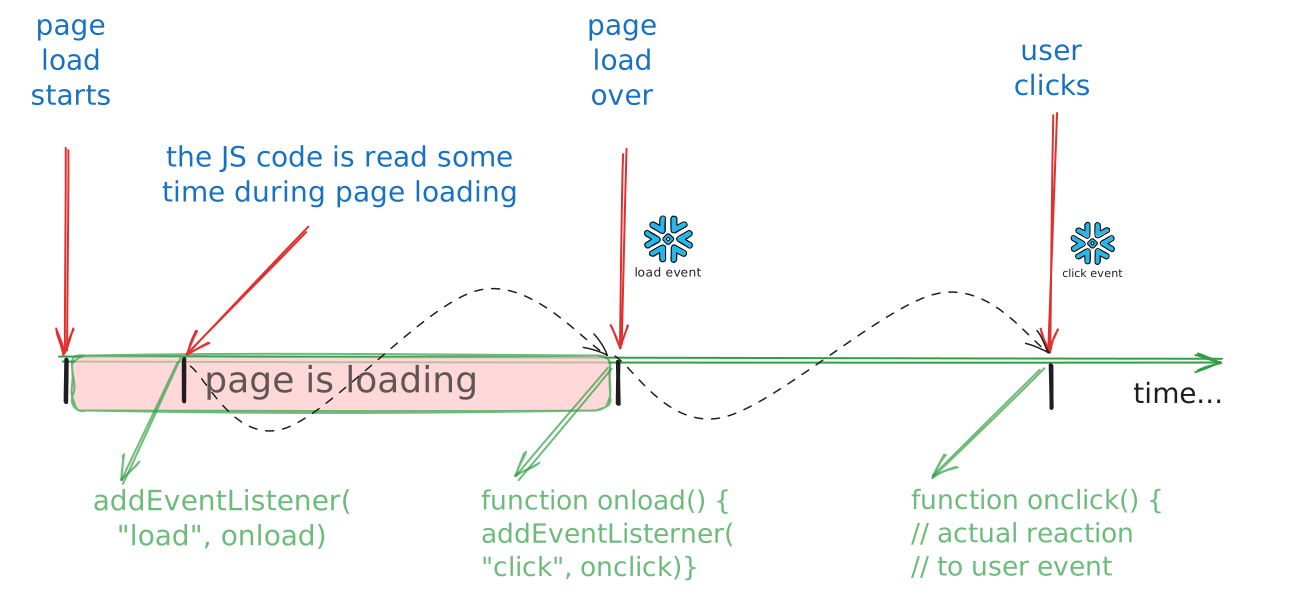
example - observations
notice from the example :
other types of events
time-related events
setTimeout(foo, 3000)  // call foo once in 3000 ms
setInterval(foo, 3000) // call foo every 3000 msrequestIdleCallback
for the geeks:
there is also a requestIdleCallback that is used to schedule a function to run when the browser is idle
so if you have a big chunk of code to run, you can use this to avoid blocking the UI
you will have to explicity split your code into chunks, though
code-generated events (optional)
you can create your own event by code, e.g. :
const foo = () => console.log("foo ! ")
const event = new Event('myevent')
// Listen for the event - on any element
document.body.addEventListener('myevent', foo, false)

// Dispatch the event.
document.body.dispatchEvent(event)
anonymous functions
due to the extensive use of callbacks in JavaScript, having to name every function is annoying
for this reason, JavaScript has 2 convenient ways to create anonymous functions:
the modern one (arrow functions)
const mylambda0 = (arg0, arg1) => { /* some code here */ }the legacy one:
const mylambda0 = function (arg0, arg1) { /* some code here */ }
anonymous function usage
in this context, it is common to create functions on the fly, e.g.
document.addEventListener(
    "DOMContentLoaded",
    // the expression on the following line
    // returns a function object
    () => console.log("page loaded")
)
the example with arrow functions
functions vs arrow functions
⚠️ Both variants
functionand=>are valid, even if the new one looks nicerWarning about return values: study carefully the following example:
const arrow_without_brackets = (a) => a*2
const arrow_with_brackets = (a) => { a*2 }

console.log("arrow without brackets:",
            arrow_without_brackets(3))
console.log("⚠️ arrow with brackets: ⚠️",
            arrow_with_brackets(3))
const function_with_return = function (a) { return a*2 }
const function_without_return = function (a) { a*2 }
console.log("function with return:",
function_with_return(3))
console.log("⚠️function without return: ⚠️",
function_without_return(3))another subtlety: this
thisalso, there are subtle differences about the this variable, not covered here
limits of callbacks
highly recommended to study the introduction to callbacks in javascript.info
that highlights the fundamental drawback of using callbacks
which is that you need to split your code into pieces, and fit the pieces into functions
it easily becomes hard to read and modify, especially if there is logic involved
practice: blinking background
now could be the right time to see the exercise on a blinking background !
practice: a dynamic grid - step 2
you can now go and finish the TP on the dynamic grid on github !
closures
it is rather frequent that a callback needs to access a variable
that sits outside of the function contextit is safe to use lexically-bound variables inside the callback
see the
contextvariable in the example below
see also this thorough article on closures on javascript.info
closure example
run in your browser console
we don’t run this code here, as we’re sliding outside of the notebook’s comfort zone..
feel free to cut and paste the code into your web browser’s console
1 2 3 4 5 6 7 8 9 10 11 12 13 14 15 16 17 18 19 20 21 22 23 24 25// here the 'context' variable is not visible { // <- this is the block where 'context' is visible let context = {a:1, b:2} setTimeout( // here the 'context' variable is visible and remains valid // even if we leave the block () => console.log("in the callback: ", context), 2000) console.log("NOW timeout armed") } // <- end of context's scope // and so from here 'context' is no longer visible // let us prove it: try { context } catch(err) { console.log(`OOPS not visible in global scope: ${err.message}`) } // BUT: wait for 2s and see the callback still triggers properly // it means that the 'context' variable somehow is still alive
takeaway
contextis created in a blockthat is long gone at the time the callback triggers
but it is still reachable from the callback
as it was captured in the closure
let vs var
a broken example
an example with
varin effect creates a globaliwhile the one with
letbehaves as expected
// again you need to run this in the browser console

function ko() {
  // DO NOT USE var IN YOUR CODE !
  for (var i=1; i<=3; i++) {
     setTimeout(() => console.log("ko, i =", i),
                100*i)
    }
}

ko()
function ok() {
// use let instead
for (let i=1; i<=3; i++) {
setTimeout(() => console.log("ok, i =", i),
100*i)
}
}
ok()takeaway
take home message is: never use
vardeclarationsit is old-fashioned and badly broken