nothing but the usual
set of builtin types similar to Python’s offering
atomic : numbers, strings, booleans
containers : arrays (lists), maps (dicts) and sets
objects
atomic types
numberis the default type for numeric valuesbooleanmay betrueorfalsestringis, well, for strings
// usual operators, here
// ** is power and
// % is modulo
(100 ** 9) % 11
// strings with ' or "
let s1 = "abc" + 'def'
let s2 = 'ab' + "cdef"
s1 == s2atomic types (continued)
nullis similar to Python’sNoneundefinedas mentioned earlier, JavaScript is very permissive
some expressions return
undefinedinstead of raising an exception
NaNis “Not a Number”
// in anticipation:
// let's create an object
let object = { x: 10, y: 20}

// in Python this would trigger an exception
// but not is JS

console.log(object.z)
// this also does not
// work like in Python
3 * "abc"boolean operators
the syntax for boolean operators is here again inherited from C / C++ / Java:
and: | or: | not: |
if (true && true) {
    console.log("logical and is &&")
}
if (true || false) {
console.log("logical or is ||")
}if ( ! false) console.log("not is ! ")strings
litteral string:
very much alike Python - can use single or double quotes
const message = "hello world" // or 'hello world'formatted string:
remember the equivalent of f-strings is
`made with ${expression} inside backticks`
let a = 10
let s = `format expression like ${a*a} in a string`
s
equivalent in Python
# which in Python would be

a = 10
s = f"format expression like {a*a} in a string"
// there are also tons of methods to deal with strings, e.g.
console.log(`length of s is ${s.length}`)more on strings
for a deeper study, see javascript.info:
arrays
similar to Python’s
lists
// arrays can be heterogeous

let array1 = [1, "two"]

// you can also create an
// empty instance explicitly

let array2 = new Array()

// or simply
let array3 = []
// insert at the end: push() (not append)
array2.push(3)
array2.push("four")
array2.push(5)
console.log(array2)// and get it back with pop()
array2.pop()common operations on arrays
// use the concat method

let array = array1.concat(array2)
array
// and NOT addition,
// it does NOT work like in Python
array1 + array2// indexing starts at 0
array[2]// getting length is more OO than in Python
array.lengthsearching in array
like with Python lists, searching in an array is linear in its length
so like in Python if you need fast access, use a Map instead (more on this right away)
// searching; >=0 means it is found

console.log(array.indexOf(3))
// otherwise -1
console.log(array.indexOf("absent"))for .. of: iterating over values
using
for .. ofit is possible to iterate through an array like in Python:notice the use of
letto define a variable local to theforloop
for (let x of array1) {
    console.log(x)
}
for .. in: iterating over indices
this is a little bit like when using enumerate() in Python
for (let i in array1) {
    console.log(i)
}
using
for .. initerates over indices but wait, it can behave oddly...
other stuff on arrays
like always, there are many more methods available, like
.sort(),.reverse().join(),.slice(),.splice(),.shift(),.unshift()
more on arrays
for more details, see on javascript.info
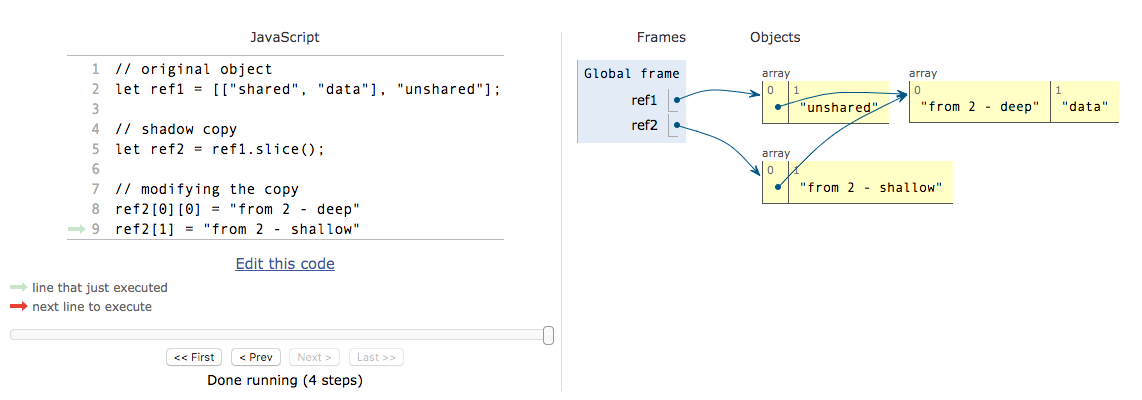
shared references (advanced)
exactly like in Python, objects can be accessed from several references
so you need to shallow- or deep-copy depending on your needs
let ref1 = [
  ["shared", "data"],
   "unshared"]
ref1
// slice() works like Python's [:] // so it's a shallow copy let ref2 = ref1.slice() ref2// changing data from ref2 ref2[0][0] = "from 2 - deep" ref2[1] = "from 2 - shallow" ref2// impacts ref1 // but not on first level // because it is a shallow copy ref1
pythontutor illustration
args are passed by reference (advanced)
like in Python, when passing a composite object (array, map, object, …) to a function
you pass a reference (not a copy), so the function can alter its parameter
so this means shared references and possible side effects
// on an array
function side_effect(arg) {
    arg[1] *= 1000
}

let list = [0, 1, 2]
side_effect(list)
list
arguments passing is loosely checked
// just display arguments
function foo(x, y, z) {
    console.log(`x=${x}, y=${y}, z=${z}`)
}
// works fine, of course
foo(1, 2, 3)// missing param ? works fine TOO !
foo(1, 2)// extra param ? this one AS WELL !!
foo(1, 2, 3, 4)more on arguments (advanced)
unlike Python there is no named arguments ~~
foo(arg0=10)~~and no argument with default values
there is however a way to deal with a variable number of arguments
make sure to also check out the section on optional parameters later on
// equivalent to Python's
// def bar(x, y, *args):

function bar(x, y, ...args) {
    // display what we receive
    console.log(`x=${x}, y=${y}`)
    console.log(`args=${args}`)
    // the args object can be iterated on
    for (let arg of args) {
        console.log("iter over", arg)
    }
}

// with this call
// the 2 extra args are captured
bar(1, 2, 3, 4)
// and the other way around
// with the so-called spread operator
function foo(x, y, z) {
// just to illustrate how mapping works
console.log({x, y, z})
}
const L = [1, 2, 3]
// just like foo(*L) in Python
// (remember we've seen the same
// construction with objects earlier too)
foo(...L)hash-based data types
MapandSetare JavaScript builtin typesthat match Python’s
dictandsetrespectively
they exhibit the same constant-time lookup nice property
like in Python, make sure to use them whenever you need fast searching and indexing
let map = new Map()

map.set('name', 'John')
map.set('age', 12)

console.log(`${map.get('name')} is ${map.get('age')} years old`)
// iterating over map
for (let k of map.keys()) {
console.log(`key=${k}, value=${map.get(k)} of type ${typeof map.get(k)}`)
}see also
objects
as the name suggests, objects are the building block for OOP
they are similar to Python’s class instances
in that they can hold attributes (Python vocabulary)
that in JavaScript are called key-value pairs
// notice that, unlike in Python we
// don't need quotes around key names

let bond = {
    first_name: "James",
    last_name: "Bond",
}

console.log(
    `my name is ${bond.last_name}`)
// check for a key
'first_name' in bondJS objects vs Python dicts
the syntax for JavaScript objects, as well as the key/value vocabulary
make them look like Python dictionaries
do not get confused though, JavaScript objects are much more alike Python instances !
class instances are objects
the class construct allows to name your own type
and instances of that type are objects just like the previous example
class Person {
    constructor(first, last) {
        this.first_name = first
        this.last_name = last
    }
}

let person = new Person("James", "Bond")

typeof(person)
// objects are passed by reference too
// so this function can modify its object argument
function change_object(obj) {
obj.first_name = 'BOOM'
}
let person2 = new Person('John', 'Doe')
change_object(person2)
person2examples
// how to write an object's keys

// note that the values MUST BE
// valid JS expressions

let options = {

    // quotes are not needed in the key
    // if it looks like a variable
    margin_left: '10px',

    // but it's allowed to put them
    'margin_right': '20px',

    // and required if the key is odd
    // (can be any string really)
    // so here with a space inside
    'margin space': true,
}

options
let x = 10
let options2 = {
// and, oddity, just this
x,
// replaces x: x
y: 20,
z: 30
}
options2more examples
// how to concatenate objects

let options3 = {
    margin_top: '30px',
    // how objects can be concatenated
    ...options,
    ...options2
}

options3
// how to shallow-copy
let copy = {...options}
copy.add = 'more'
copyiteration over object keys
several options; probably the safest is
for (let [key, value] of Object.entries(bond)) {
    console.log(`${key}: ${value}`)
}
or to iterate over keys only
for (let key of Object.keys(bond)) {
    console.log(key, ':', bond[key])
}
unpacking objects (reminder)
this is also known as deconstructing / reconstructing
and these are truly all over the place in modern JavaScript code
unpacking an array
// similar to Python's tuple unpacking

{
    let [a1, a2] = [100, 200]
    console.log(`a1 now is ${a1}, a2 is ${a2}`)
}
unpacking an object
there is a similar destructuring assignment on objects
const example_obj = {
    name: "doe",
    phone: '0123456',
    other: 'some stuff',
}

function demo(obj) {
    // extract only a subset of the object keys
    // and assign them into variables with the same names
    const {name, phone} = obj

    console.log(
        `variable name is ${name}, phone is ${phone}`)
}

demo(example_obj)
object as optional parameters
the parameter-passing mechanism is not as powerful as Python
but here’s a common pattern to define optional parameters with default values
// one mandatory parameter, the other ones
// - say width and height - are optional

function foo(mandatory, options) {
    // the default values
    const default_options = {width: 10, height: 10}
    const {width, height} = {...default_options, ...options}
    console.log(`mandatory=${mandatory}, width=${width}, height=${height}`)
}foo("something")foo("else", {height: 800})console.log() and objects
TIP about debugging JS objects :
const vector = {x: 1, y: 2}

// it may be tempting to write
console.log(`vector = ${vector}`)
// but it is a lot better like this
console.log("vector = ", vector)accessing object keys (advanced)
a reminder too:
you can access an attribute with either of these 2 forms
object.first_nameobject['first_name']
the difference being that
object.first_nametakes the key name literallyobject[expr]evaluatesexpr, that should give a key name
// we need a way to express that a field name is actually an expression
// that we want to evaluate (could also be a simple variable)

const obj = {["comp" + "uted"]: 1}
obj
Wat ?
And now for a bit of fun: the famous “Wat” lightning talk by Gary Bernhardt is a must-watch for JavaScript programmers